06Chapter 6 of 12
Call Analytics
Reference material for call analytics.
/portal/calls
A searchable history of every call on the tenant — with AI transcript search, sentiment scores, MOS, recording playback, and transcript view on the detail page.
Header
| Element | What it shows / does |
|---|---|
| Breadcrumb | Dashboard / Calls. |
| Title | Calls. |
| Subtitle | "{count} calls in the last {range} · {host}". |
| Export CSV | Download the filtered rowset. |
Search and filters
The search box runs across caller name, number, and (when transcripts exist) the transcript content itself. An AI · transcript search badge with a help tip explains the search scope. The match summary appears as "matched in {N} transcripts of {M} transcribed calls" when transcript hits are returned.
| Filter group | Chips |
|---|---|
| Direction | Inbound · Outbound · Internal |
| Status | Answered · Abandoned · Failed · Voicemail |
| Date range | Today · Yesterday · 7d (default) · 30d · Custom (with from/to date pickers) |
| Sentiment | Positive · Neutral · Negative |
| Has recording | Toggle (Off by default) |
| + Add filter | Opens a popover for extra filters (min/max duration, extension, trunk). |
Results table
| Column | What it shows |
|---|---|
| When | Day · time. |
| From → To | Both parties; a ● rec chip marks calls with a recording. |
| Direction | Coloured pill (In / Out / Internal / unknown). |
| Status | Answered / Abandoned / Failed / Voicemail. |
| Duration | mm:ss. |
| MOS | The Mean Opinion Score for the call, when audio quality data exists. |
| AI | Sentiment label and score (e.g., ● neutral · 0.71). |
| Actions | Play (▶) and Transcript (≡) icons. |
Click a row to open the call detail page.
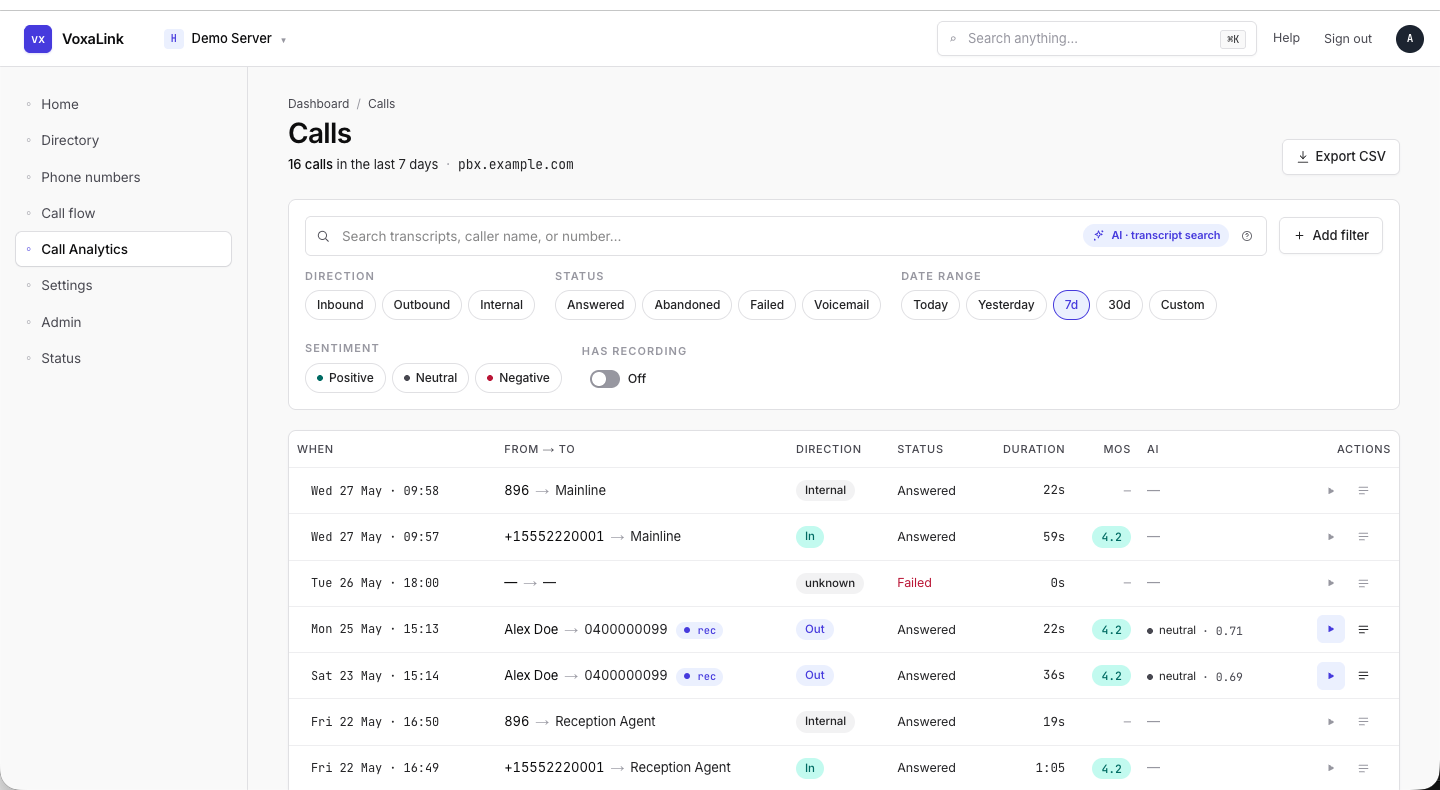 Call Analytics — 7d range with Direction/Status/Sentiment chips and a row showing AI sentiment.