Directory
Reference material for directory.
/portal/accounts
The Directory is the People view — every extension on the tenant. Other account types (auto attendants, conferences, ring groups, queues, paging groups, service flags, park orbits) are not here; they live under Call flow.
Header
| Element | What it shows / does |
|---|---|
| Breadcrumb | Home / Directory. |
| Title | People with a summary line: "{count} people · {locations} locations · {active} active". |
| Import CSV | Bulk-create people from a spreadsheet. |
| + Add a person | Open the create form (keyboard shortcut N). |
Tabs
The list is filtered client-side by:
| Tab | Filter |
|---|---|
| All | Every extension. |
| Available | Registered and not currently on a call. |
| On a call | Currently in a call. |
| Offline | Disabled or never connected. |
| Devices unregistered | No active SIP or push registration right now. |
The number in each tab is a live count.
Search
A single search box filters the visible rows by name, email, or extension.
Table
| Column | What it shows |
|---|---|
| Selection checkbox | Adds the row to a bulk action. |
| Person | Avatar with initials, display name, and "ext {number}" beneath. |
| The address on file, or "—" if blank. | |
| Devices | Number of phones registered to this extension. |
| Status | Coloured pill — Available (green), On a call (blue), Offline (grey), Unregistered (amber). |
| Last seen | Time of last activity, or "registered" / "—". |
| Row menu | A ⋯ button on the right with quick actions (open, disable, etc.). |
The row count "Showing 1–N of M" plus Previous / Next pagination sits below the table.
Bulk actions
Select one or more rows and the toolbar above the table reveals bulk actions.
+ Add a person form
Open from the + Add a person button.
| Field | Required | What it does |
|---|---|---|
| First name | Yes | The person's first name. |
| Last name | Yes | The person's last name. |
| Extension number | Yes | 3 to 15 digits, unique across the tenant. The "Will appear in the directory as —" line previews the display name live. |
| Display name | No | Override the auto-generated name. Leave blank to use First + Last. |
| Email address | Yes | Used for sign-in, voicemail email, and recovery. |
| Password | Yes | Used for SIP registration and the user portal. Minimum 8 characters, at least one uppercase letter and one number. Click SHOW to reveal what you've typed. |
| Button | What it does |
|---|---|
| Create extension | Creates the account and opens the editor. |
| Cancel | Returns to the Directory. |
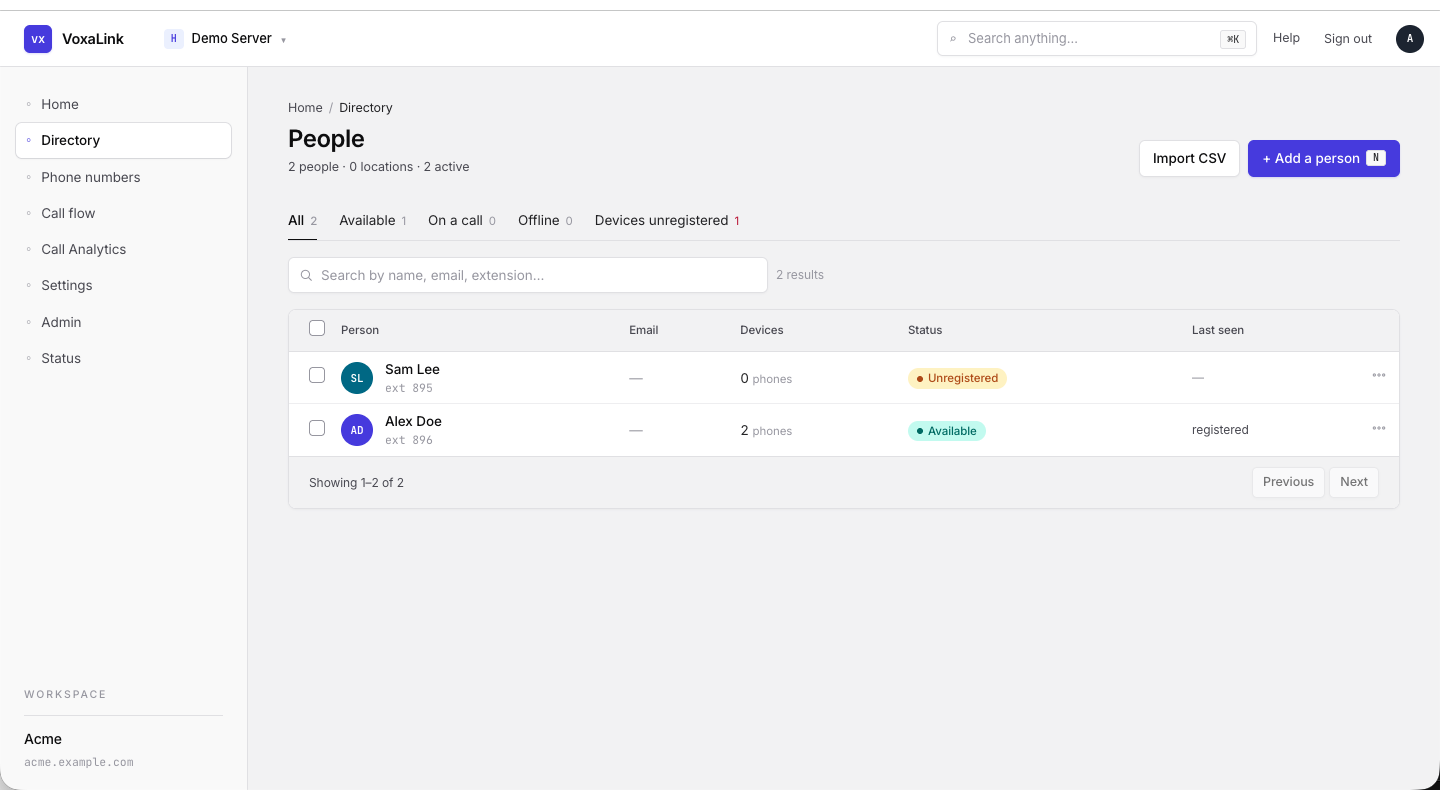 Directory — All tab, two people listed.
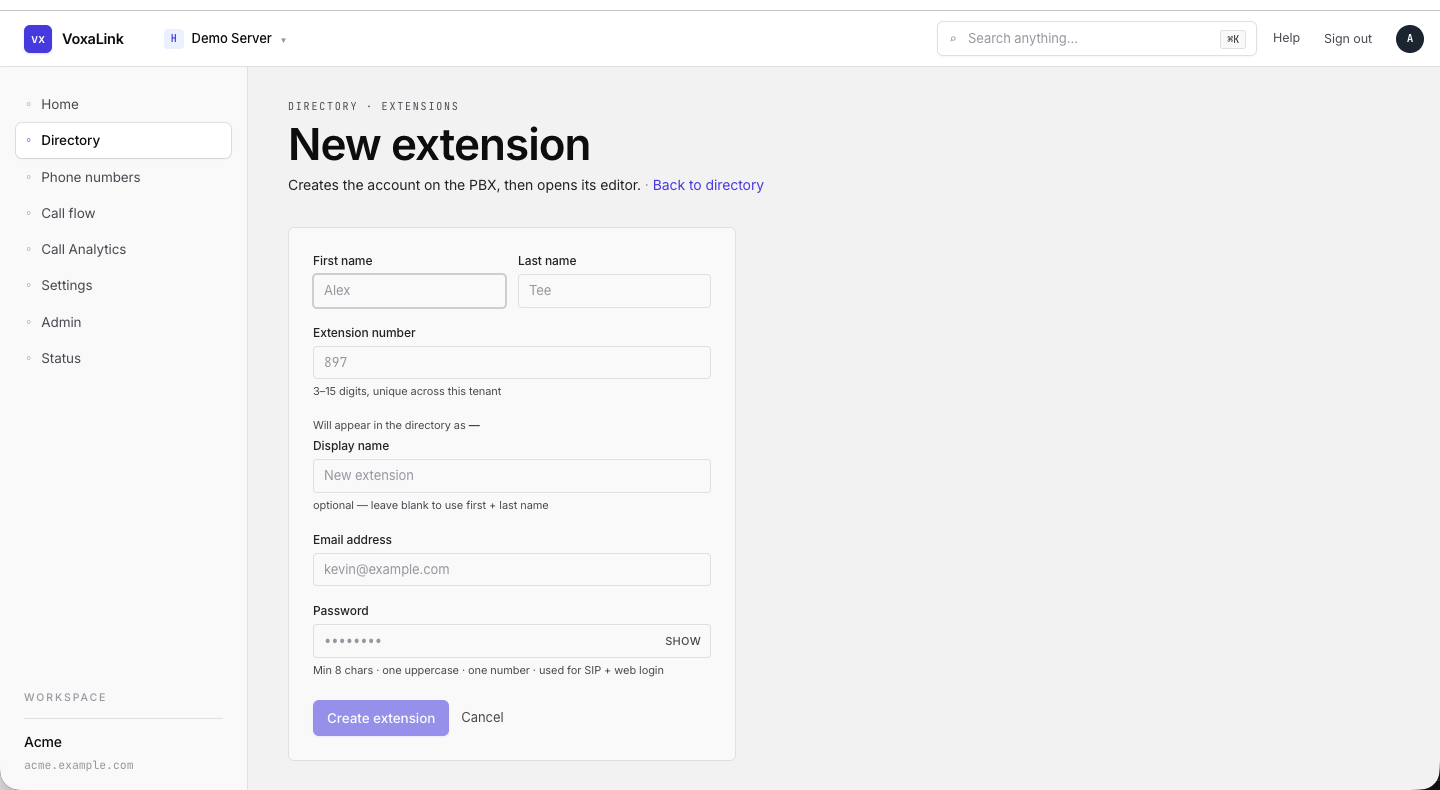 + Add a person form with the live display-name preview.
Extension editor
Open by clicking a row in the Directory.
Header card
| Element | What it shows / does |
|---|---|
| Breadcrumb | Directory / {Display Name}. |
| Avatar | Initials. |
| Display name | Large title. |
| Status pill | Available (green) / Offline (grey). |
| Meta line | extension {number} · {N} devices registered · last active {when}. |
| User Mode | Opens the Vodia softphone in a new tab as this extension. Greyed out if no password is set yet. |
Tabs
| Tab | What it controls |
|---|---|
| General | Identity, sounds, administrator-only basics, monitoring and call pickup, address book. |
| Redirection | Call forwarding, mobile numbers, recording defaults. |
| Mailbox | Voicemail behaviour, prompts, mailbox source recordings. |
| Email forwarding and digest schedule. | |
| Registration | Currently registered devices and the registration audit history. |
| Permission | Group memberships. |
| Buttons | Physical phone button programming. |
| Webhooks | Per-extension event webhooks. |
| Graphs | Call and registration charts for this extension. |
| User Page Field Control | Which fields and features appear for this person on the mobile app's user page. |
| Hidden | Advanced fields shown for visibility only — not normally edited. |
| Raw JSON | The raw Vodia JSON for the account. Use only when guided. |
The Filter… input in the tab strip narrows the visible fields.
Sections sidebar (General tab)
| Section | What it covers |
|---|---|
| Account Profile | Names, short name, login PIN — the basics other people see when this person calls. |
| Sounds | Ringtones and audio choices. |
| Administrator only | Account class, dial plan, license — admin-restricted fields. |
| Monitoring and call pickup | Group monitoring and pickup behaviour. |
| Address Book | Per-extension address book entries. |
Account Profile fields (example)
| Field | What it does |
|---|---|
| First name | Shown for all internal and external calls. International characters allowed. |
| Last name | Same. |
| Short name | Used where space is tight, like soft labels on VoIP phones. |
| Login PIN | Used for voicemail access from outside, calling cards, and hot-desking. 3–6 digits. |
| Timezone | Affects timestamps for the mailbox and everything else tied to this extension. Default = inherit from domain. |
| IVR language | Language for system voice prompts and the LCD display on the user's phone. |
| From-header | What a VoIP phone shows on its display when someone calls this extension. |
| Block outgoing caller-ID | When on, this user's caller-ID is hidden on outbound calls. |
| Enable call waiting | Lets a second incoming call beep through while this extension is on a call. |
| Wake-up time | Schedules an automatic wake-up call from the system. Hospitality-style; usable for individuals too. |
"What this means" preview (right rail)
Every edit tab has a plain-English preview card that updates live from the form. Example bullets:
Outbound caller ID shown to the other party: 61488823366, 61485998226.
Outbound SMS goes out as +61488823366.
Outbound dialing goes through the "Default" dial plan.
This is the safest place to confirm the impact of a change before saving.
Footer
| Button | What it does |
|---|---|
| Save changes | Persists the current tab. |
| Reset | Reverts unsaved edits on the current tab. |
| Delete account | Removes the extension. Confirmation required. |
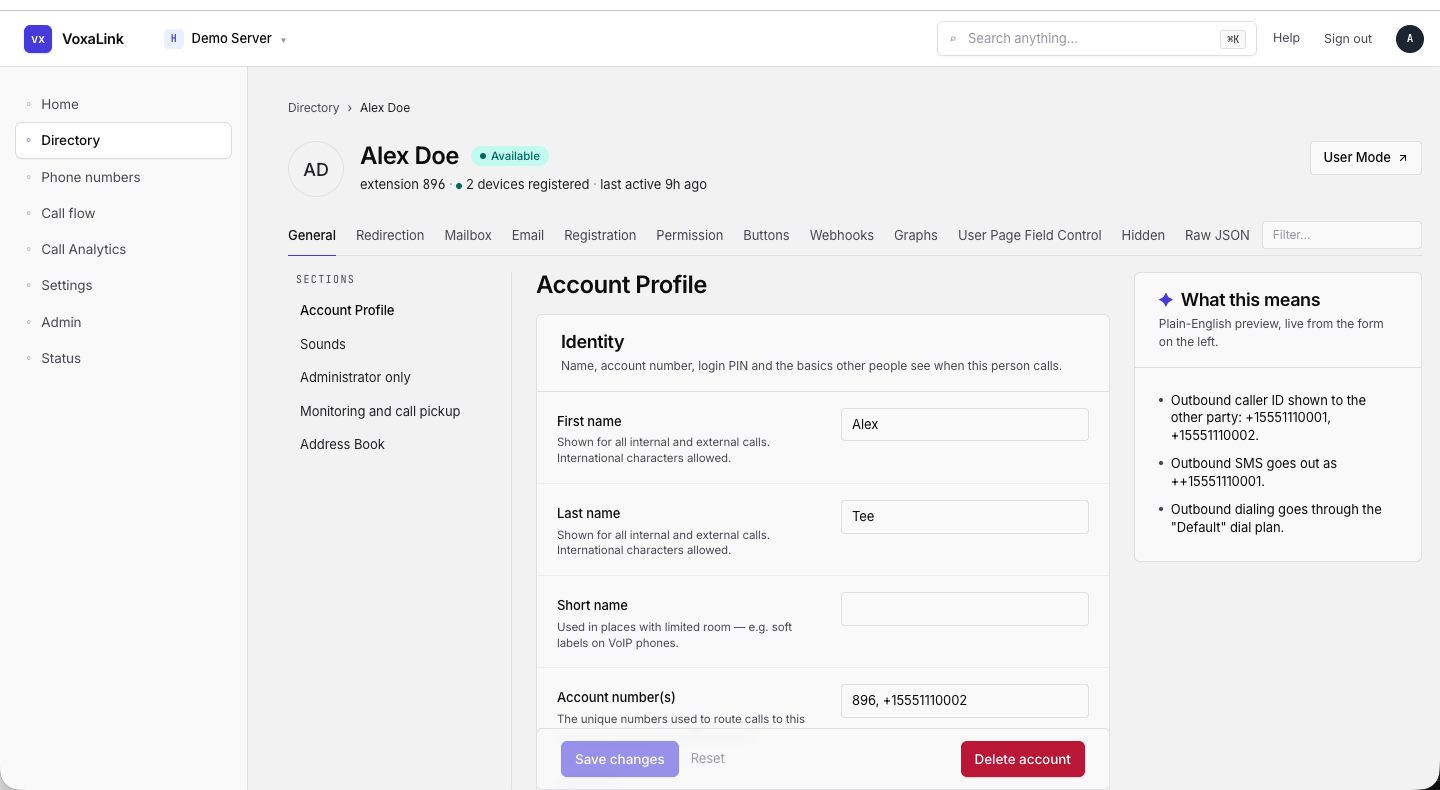 Extension editor — Alex Doe, General tab, sections sidebar + "What this means" preview rail.